Version 1.3 — Available Now

Your new tab,
reimagined.

A private dashboard that replaces Chrome's empty new tab with 25+ integrated tools. Search, weather, news, AI chat, radio, finance — all connected, all yours.

Most new tab extensions give you a wallpaper and a clock. We built something different.

kNewTab is 25+ tools that talk to each other. Save a search result to your notes. Turn a bookmark into a task. Listen to internet radio while a procedural landscape pulses to the music. Nothing lives in a silo.

$4/month to see your own bookmarks?
We'd never.

Everything Connects

One dashboard.
Zero walls between features.

Every tool in kNewTab is aware of the others. Data flows naturally between widgets, so you never copy, paste, or switch tabs.

🌦️

Weather Station

Hourly charts, 7-day forecast, live radar, air quality, pollen, space weather, and NWS storm alerts with audio. Weather Pulse gives you rotating insight cards at a glance.

Drives the Living Landscape
?
📰

News & RSS

Pick your topics and get rotating headline cards with full images. Add feeds from 50+ curated sources or any RSS URL. Stay informed without opening another app.

Share to Notes & Todos
📝

Notes & Scratch Pad

Capture ideas the moment they happen. Markdown formatting, linked web pages, file attachments. Use the scratch pad on the widget face for quick notes without opening the editor.

Links pages from Search, History

Task Manager

Subtasks, due dates, priorities, Kanban board, linked pages. Color-coded urgency with overdue warnings. Turn anything into a task with one click — the page link comes with it.

Links from any widget
⏱️

Clock & Focus Tools

World clock with a day/night map, countdown timers, stopwatch with laps, Pomodoro sessions, date countdowns, and "On This Day" from Wikipedia. Six tools in one widget.

Timer rings on the dock
🧲

The Dock

Top sites, pinned tab groups, recently closed tabs, and widget shortcuts — all in one bar. macOS-style magnification on hover, four visual styles, and it adapts to whatever you're doing.

Launches any widget
🔖

Bookmarks & History

Browse bookmarks in tree, list, or grid view. Group by folder, domain, or date. Spot stale links automatically. Plus a full history browser with timeline view and domain clustering.

Dead link alerts, visit stats
🤖

Ollama AI Chat

Chat with local AI models via Ollama. Streaming responses, conversation history, model picker. Your conversations never leave your device — it's all localhost.

100% local, zero cloud
📈

Finance & Crypto

CoinGecko-powered watchlist with sparkline charts, price alerts, and portfolio tracking. Track Bitcoin, Ethereum, and thousands of tokens right from your dashboard.

Real-time price data
📻

Internet Radio

SomaFM + Radio Browser: 30,000+ stations worldwide. Browse by genre, save favorites, see now-playing info. Background playback while you work on your dashboard.

Audio-reactive landscape
🎨

Make It Yours

Drag-and-drop widget grid. Unsplash backgrounds. Four dock styles. Multiple widget pages. Adjustable sizing, spacing, and colors. Your new tab should feel like yours.

Every detail is adjustable

No accounts. No tracking. No cloud storage.
Your data never leaves your computer.

Always Aware

A weather station that actually keeps you safe.

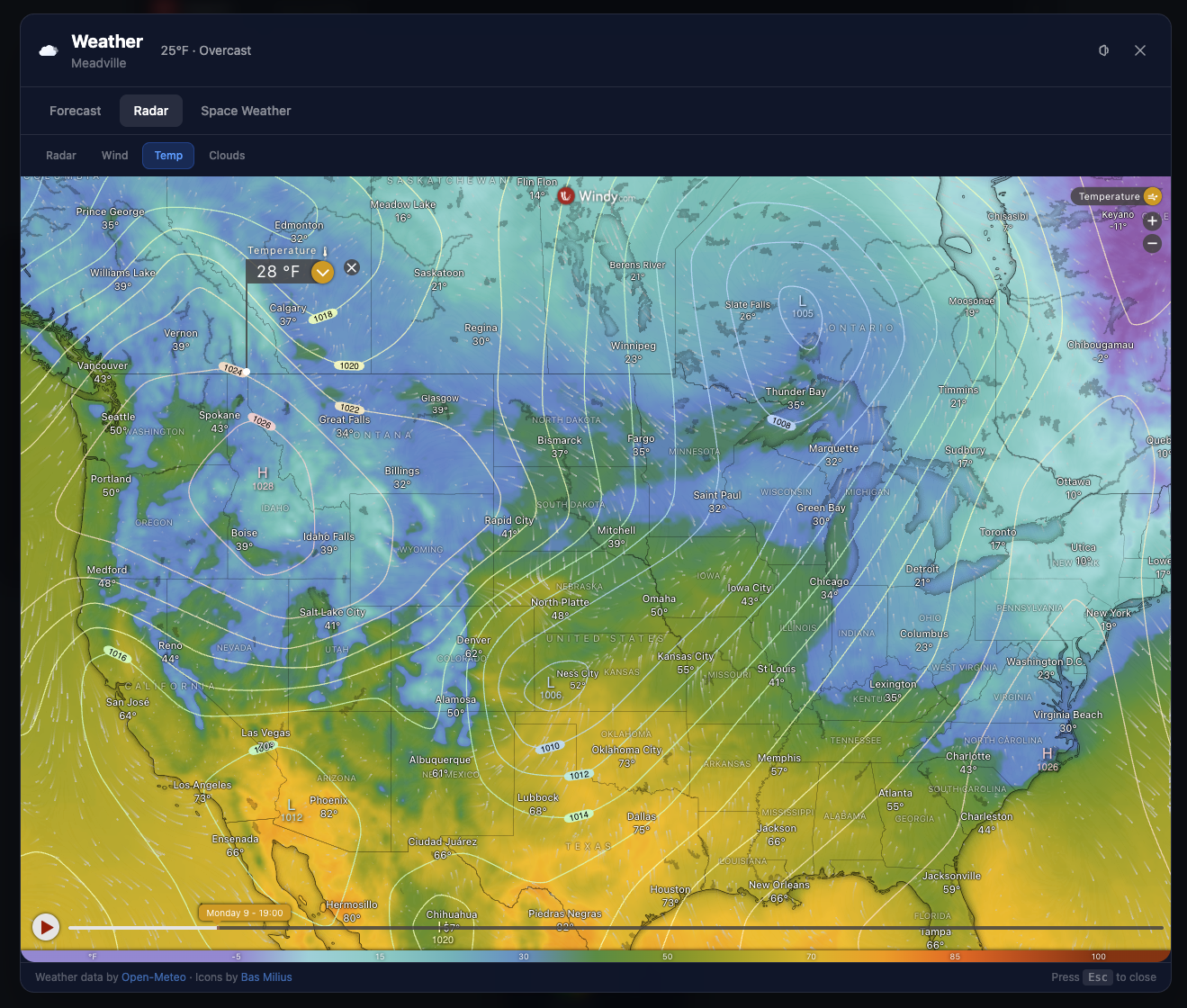
Not just temperature and a sun icon. kNewTab gives you hourly forecasts, a 7-day outlook, live radar, air quality, pollen levels, and space weather — all in one overlay.

When the National Weather Service issues a storm alert for your area, you'll see it immediately. Turn on audio forecasts and kNewTab will read the conditions aloud. Weather Pulse shows rotating insight cards on the widget face.

  • Storm alerts — NWS warnings front and center, with audio
  • Air quality & pollen — know before you go outside
  • Space weather — aurora forecasts and solar activity
Weather radar showing live temperature map across the US with Windy integration
Living Wallpaper

A landscape that breathes with your world.

Not a static wallpaper — a procedural, animated landscape that changes with the time of day, the weather outside, and even the music you're playing.

Watch aurora borealis dance across the night sky. See rain streak down and snow accumulate into drifts with tiny snowmen. Hot air balloons drift past. The sun tracks your real-world position. And when you connect a music tab, the mountains pulse to the bass.

  • Real-time sync — day/night cycle matches your actual sun position
  • Weather effects — rain, snow, lightning, fog driven by real forecast data
  • Audio reactive — mountains bounce to bass, stars to treble, aurora to melody
🌄 Procedural — every frame is generated live
And That's Not Even Half of It

Every tool you didn't know you needed.

Use what you want, hide the rest.

📥

Download Organizer

Recent downloads on your new tab. Sort by date, size, or type. Open, reveal in folder, or clear — without Chrome's download page.

🗂️

Tab Groups

Save open tab groups to your new tab. Restore them later, add pages manually, keep research sessions organized across days.

💬

Quotes

Rotating quotes that change with each new tab. Something to think about while your coffee brews. Curated, never repetitive.

📖

Library Side Panel

Unified bookmarks, reading list, and tab groups in a Chrome sidebar. Everything organized in one place, always accessible.

🌌

World Clock

Live day/night map with city pins. Add cities, compare time zones. Great for remote teams or checking if your friend is awake.

📷

Unsplash Backgrounds

Browse thousands of high-res photos and set them as your background. New ones daily, or keep your favorites.

🆔

Top Sites

Most visited sites, right where you need them. Quick access without bookmarking. The dock pulls these in automatically.

🎯

Pomodoro & Timers

Focus sessions with Pomodoro, countdown timers with dock badges, a stopwatch with laps. Six time tools in one widget.

💻

Drag-and-Drop Grid

Resize any widget. Drag it anywhere. Multiple pages of widgets. CSS-native grid that's buttery smooth.

🔒

Export & Import

JSON backup with optional AES-256 encryption. Cross-device transfer. Your data, your backup, your control.

📥

Download Organizer

Recent downloads on your new tab. Sort by date, size, or type. Open, reveal in folder, or clear — without Chrome's download page.

🗂️

Tab Groups

Save open tab groups to your new tab. Restore them later, add pages manually, keep research sessions organized across days.

💬

Quotes

Rotating quotes that change with each new tab. Something to think about while your coffee brews. Curated, never repetitive.

📖

Library Side Panel

Unified bookmarks, reading list, and tab groups in a Chrome sidebar. Everything organized in one place, always accessible.

🌌

World Clock

Live day/night map with city pins. Add cities, compare time zones. Great for remote teams or checking if your friend is awake.

📷

Unsplash Backgrounds

Browse thousands of high-res photos and set them as your background. New ones daily, or keep your favorites.

🆔

Top Sites

Most visited sites, right where you need them. Quick access without bookmarking. The dock pulls these in automatically.

🎯

Pomodoro & Timers

Focus sessions with Pomodoro, countdown timers with dock badges, a stopwatch with laps. Six time tools in one widget.

💻

Drag-and-Drop Grid

Resize any widget. Drag it anywhere. Multiple pages of widgets. CSS-native grid that's buttery smooth.

🔒

Export & Import

JSON backup with optional AES-256 encryption. Cross-device transfer. Your data, your backup, your control.

Every detail is adjustable.
Because it's your browser.

Your Rules

Make it yours. We mean it.

This isn't "pick a theme from three options." Every widget, every layout, every pixel is yours to control.

📷

Unsplash & Living Landscapes

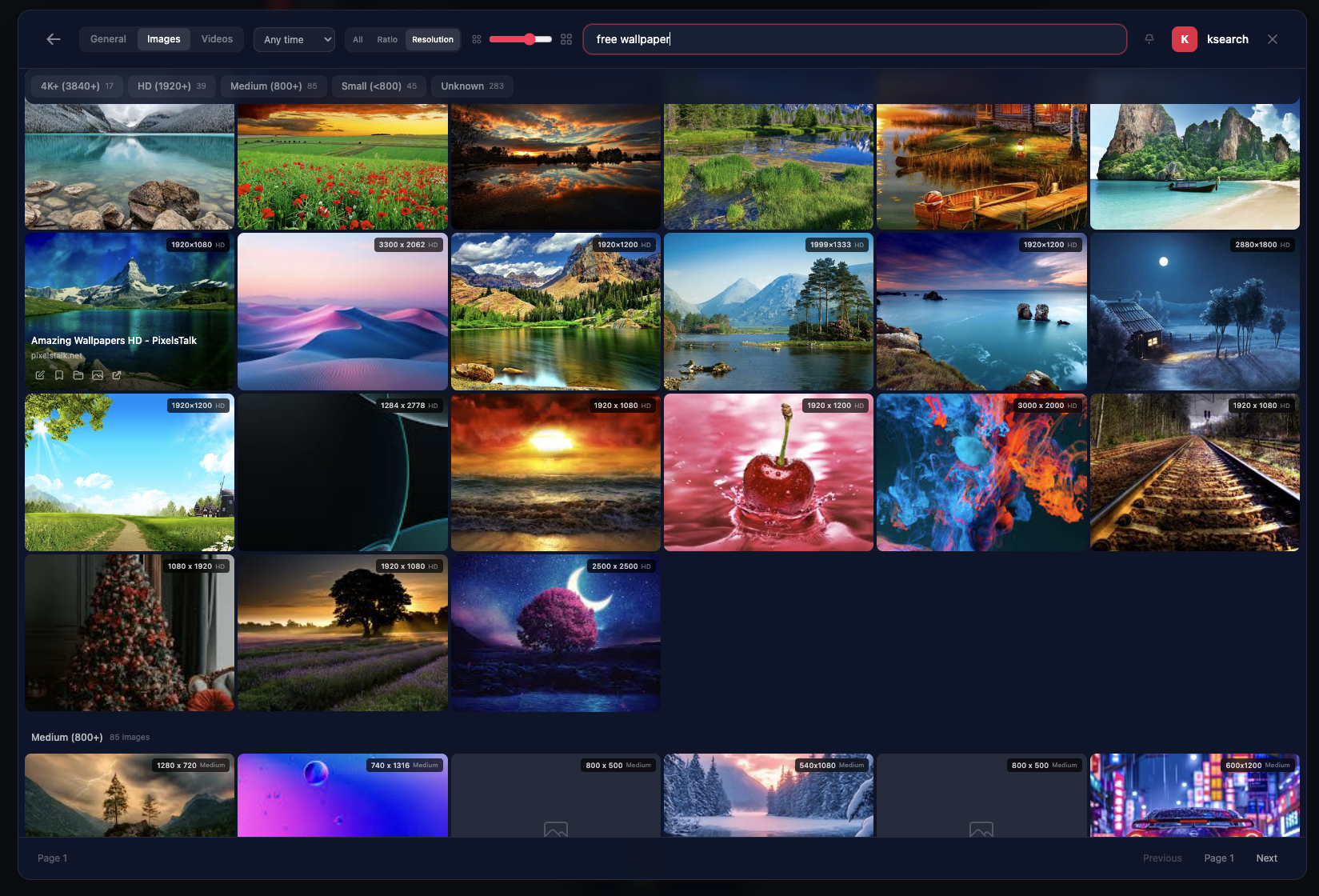
Browse Unsplash from settings. Search by keyword, preview at full resolution. Or go dynamic with a procedural animated landscape that reacts to weather and music.

Thousands of photos + fully configurable animation.
🧲

Four Dock Styles

Glass, solid, minimal, or floating — the dock adapts to your aesthetic. Magnification on hover, custom sections, overflow shelves. It's a command bar that looks the way you want.

Magnification, pinned groups, widget shortcuts.
📐

Drag-and-Drop Grid

Resize any widget. Drag it anywhere. Multiple pages of widgets (sub-grids). The grid is CSS-native and buttery smooth.

No fixed layouts. No templates. Just freedom.
Keyboard First

Command everything.
Touch nothing.

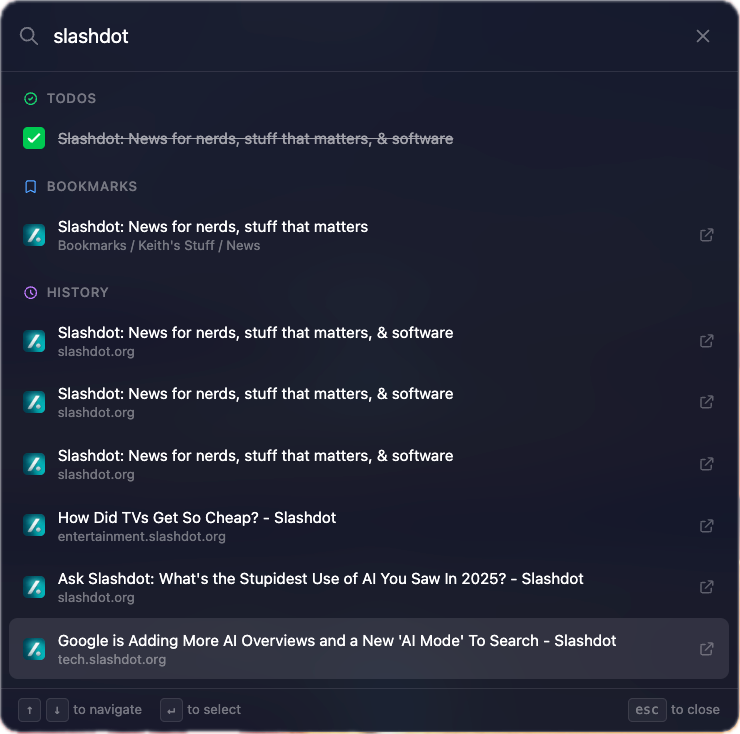
The dock isn't just an app launcher — it's a command palette. Search bookmarks, jump to a widget, open a tab group, or start a timer. All from the keyboard.

ksearch responds to single keypresses. Start typing the moment your new tab opens and results appear instantly.

Space
Open ksearch instantly
Tab
Cycle through search categories
ShiftEnter
Open result in new tab
K
Global search — bookmarks, history, the web
Esc
Close any overlay, back to dashboard
Command palette searching across todos, bookmarks, and history simultaneously

0

Built-in tools

0

Data stored on our servers

0

Curated RSS sources

Ways to make it yours

Your Data Stays Here

Privacy isn't a feature.
It's the foundation.

We don't have analytics. We don't run servers you log into. We can't see your data even if we wanted to. That's by design.

Zero Analytics

No tracking scripts, no page views, no event logging. We have zero visibility into how you use kNewTab.

No Accounts

No sign-up, no login, no profiles. Install it and start using it. Your identity is yours.

No Cloud

Your notes, todos, settings, and history never leave your computer. Everything is stored locally by Chrome.

Local Only

Your data lives in Chrome's local storage on your device. It never touches a server. For disk-level protection, enable BitLocker (Windows) or FileVault (Mac).

This is Version 1.3.
And we're just getting started.

The Journey

Built with care. Shipped with pride.

kNewTab started as a weekend project and became something real. We're actively building, fixing, and shipping new features every week.

Now

Version 1.3

25+ integrated tools, private search, weather station, living landscape, AI chat, internet radio, finance, dock, notes, tasks, RSS, and deep customization.

The Road So Far

Started small.
Then came the what ifs.

A brutally honest look at what happens when one person decides to build 25+ tools into a new tab page. Spoiler: things break.

Day 1

The Initial Commit: 38,108 Lines

142 files. One commit. A clock widget, a theme system, and a dream. The kind of commit that makes senior engineers physically ill.

Milestone

Private Search Engine — From Scratch

Built a full meta-search engine into a browser tab. Self-hosted SearXNG, custom UI with image lightbox, video previews, domain grouping, instant answers. Because apparently just linking to DuckDuckGo wasn't ambitious enough.

Bug

The New Tab Extension That Made Blank Tabs

Built a new tab replacement. Clicking search results opened... a blank tab. The most ironic bug in the history of Chrome extensions. Fixed in commit 1786113.

Hard Problem

Cosine-Curve Dock Magnification

macOS-style dock magnification using cosine interpolation with 80ms ease-out, spring-back animation on mouse leave, staggered expand/collapse with per-item delays. Took three rewrites. Worth it.

JavaScript Moment

Weather Forecast Off By One Day

new Date("2026-02-06") in a US timezone gives you February 5th. Because JavaScript parses bare date strings as UTC midnight, which rolls back in any timezone west of Greenwich. Fixed by appending T00:00:00 to force local parsing. Classic.

Bug

Svelte 5 Reactivity vs. Chrome Storage

Widget positions wouldn't save. Hours of debugging. Turns out Svelte 5's $state wraps everything in Proxy objects, and chrome.storage.local.set() silently refuses to serialize Proxies. Had to deep-clone to plain objects before every save.

Hard Problem

Space Weather in a Browser Tab

Aurora probability at your exact coordinates via NOAA's OVATION model. Solar flare summaries. Earth-directed CME tracking. A Kp index semicircular gauge. NASA's DONKI feed in a scrollable notification panel. In a new tab page. Why not.

Gag Reel

The $effect Infinite Loop Saga

Svelte 5's $effect tracks every reactive variable you read inside it. If you accidentally read and write the same state, it re-triggers forever. Found this bug three separate times in three different widgets. The fix is always untrack(). We never remember.

Oops

"Encrypted at Rest" — Except Not Really

The privacy page proudly claimed data was "encrypted at rest." Chrome's local storage is not encrypted. Had to rewrite the entire privacy section. The lesson: don't claim things you haven't verified.

Gag Reel

Reuters Killed Their RSS Feeds in 2020

Shipped 50+ curated RSS feeds. Two of them were Reuters. Reuters eliminated RSS feeds six years ago. Also, AP News was using an unreliable proxy that returned 403s. The curated sources were curated by someone who didn't check if they worked.

Hard Problem

Tornado Warning Override

The audio weather forecast has a life-safety override. If the National Weather Service issues a Tornado Warning for your area, the normal forecast is replaced with urgent survival instructions: safe place, shoes, goggles, helmet, flashlight. Then it says "go go go." Because some features matter more than others.

Gag Reel

Chrome Kills Speech After 15 Seconds

Chrome's Web Speech API silently stops speaking after ~15 seconds. No error, no event. It just... stops. The fix: pause and resume the utterance every 14 seconds in a keepalive loop. A hack so ugly it deserves its own commit message.

Bug

History Overlay Crash — The DOM Reconciliation Incident

Infinite scroll on the history view caused a crash: Cannot read properties of undefined (reading 'prev'). The scroll handler fired during Svelte's DOM reconciliation cycle, causing re-entrant state mutations that corrupted the internal linked list. Fixed with requestAnimationFrame and await tick().

Gag Reel

The Build That Kept Deleting Itself

The landing page lives in the same repo as the extension. Vite's file watcher saw every website edit, rebuilt the extension, and wiped the dist/ folder. Every. Single. Time. We fixed it five times before finding the actual cause.

Today

71,170 Lines Later

170 Svelte components. 78 TypeScript files. 25+ integrated tools. A private search engine. A weather station with space weather. A procedural landscape with snowmen. A dock with physics. And a landing page that keeps accidentally nuking the build. We're just getting started.

71K
Lines of code
170
Svelte components
41%
Commits that are fixes
3
Days to build it

Ready when you are.

kNewTab is free. No accounts. No subscriptions. No strings. Just a better new tab.

Privacy Policy

Last updated: February 23, 2026

Overview

kNewTab is a Chrome extension that replaces your new tab page. Your data stays on your device. We don't have accounts, we don't build profiles, and we don't know who you are.

Data Collection

kNewTab does not collect, store, or transmit personal data to any server we control. There are no analytics, telemetry, cookies, or fingerprinting. We have zero visibility into how you use the extension.

Search

When you search from the Search Dock, your query goes directly to whichever engine you've selected. kNewTab does not intercept or log these queries.

ksearch is an optional built-in engine powered by SearXNG, an open-source meta-search engine. Your search query, category, page, time range, and SafeSearch preference are sent to a private instance. The server does not log queries, store results, or track users. No cookies or identifiers are attached.

Search history (opt-in, off by default) is stored locally and never transmitted.

News

The News widget uses the same private meta-search server to fetch headlines. Only your topic queries are sent — no location data, IP addresses, or personal identifiers.

External Services

kNewTab calls the following third-party APIs when you use specific features. No personal identifiers are sent — only the minimum data each service needs.

ServiceData SentFeature
Open-MeteoCoordinates, unit preferenceWeather forecast, air quality, ensemble model
BigDataCloudCoordinatesCity name display
NWS (weather.gov)CoordinatesUS weather alerts
WindyCoordinates (in iframe URL)Radar / wind / temperature map embed
Sunrise-Sunset.orgCoordinatesSunrise/sunset times
NASA DONKIDate rangeSolar flares, CMEs, geomagnetic storms
NOAA SWPCCoordinates (aurora only)Kp index, aurora probability
CoinGeckoCoin IDs, search queriesCryptocurrency prices and charts
SomaFMNoneInternet radio channels and now-playing
Radio BrowserSearch queries, station clicksInternet radio station directory
WikipediaCurrent month/day"On This Date" events
QuoteSlateTag preferencesRandom quotes
UnsplashSearch termsBackground images
RSS FeedsStandard HTTP GET to feed URLArticle fetching
RedditSubreddit nameFeed validation and gallery enrichment
Google FaviconsDomain namesWebsite icons
Ollama (localhost)Chat messages, model nameLocal AI chat (never leaves your device)

Behavioral Notes

The weather radar tab embeds an iframe from Windy.com. Windy can see your IP address and may set its own cookies.

Bookmark link health checks send a HEAD request to each bookmark URL to verify it's reachable. This must be manually triggered.

When you play a Radio Browser station, a click event is sent to radio-browser.info for their popularity rankings. No user identifier is included.

News and RSS article thumbnails may be fetched from the article page to extract Open Graph images. The article server can see your IP address.

Web Server

Our website at knewtab.net runs behind nginx. Server logs record only the HTTP method, request path, response status code, and response size. No IP addresses, timestamps, user agents, referrers, or identifying information is logged.

The ksearch search server runs separately and does not log queries, results, or user identifiers.

Local Storage

All settings, notes, todos, conversation history, timers, and widget state are stored in Chrome's chrome.storage.local — stored locally on your device, synced nowhere, and it never leaves your computer. Ollama conversation history is opt-in (off by default) with a configurable retention period.

Permissions

Required permissions: storage, bookmarks, topSites, activeTab, contextMenus. Optional permissions (history, downloads, tabs, sessions, scripting, notifications, declarativeNetRequest, host access, unlimited storage) are only requested when you enable the related feature. You can revoke them at any time through Chrome's extension settings.

Contact

Keith — powderpa@icloud.com

Curated RSS Feeds

47 sources across 7 categories
🇺🇸

US News

10 sources
  • NPR
  • AP News
  • CNN
  • PBS NewsHour
  • ABC News
  • CBS News
  • USA Today
  • Washington Post
  • NY Times
  • LA Times
🌍

World News

7 sources
  • BBC World
  • Al Jazeera
  • CNN World
  • The Guardian
  • France 24
  • DW News
  • NPR World
💻

Tech

8 sources
  • Ars Technica
  • The Verge
  • TechCrunch
  • Wired
  • Hacker News
  • Engadget
  • CNET
  • Gizmodo
💼

Business

6 sources
  • Bloomberg
  • CNBC
  • Financial Times
  • WSJ
  • Forbes
  • Business Insider
🔬

Science

6 sources
  • Nature
  • Science Daily
  • Scientific American
  • Phys.org
  • Space.com
  • NASA
🎮

Gaming

6 sources
  • IGN
  • Kotaku
  • GameSpot
  • PC Gamer
  • Polygon
  • Rock Paper Shotgun
🏠

Lifestyle

4 sources
  • Lifehacker
  • Apartment Therapy
  • Bon Appetit
  • Serious Eats